
This article answers some of the most frequently asked questions about the VoCap mobile app.
General Information
Q: What is VoCap?
A: VoCap is a mobile-first audio creation platform developed by Antares Audio Technologies, the creators of AutoTune. It bridges the gap between simple voice recording apps and complex professional Digital Audio Workstations (DAWs), offering professional-grade vocal enhancement and audio processing in an accessible mobile app.
Q: How is VoCap different from other audio recording apps?
A: VoCap differentiates itself through professional-grade audio technology built on Antares' expertise in audio processing. Unlike basic recording apps, VoCap offers studio-quality results in a mobile environment with features like AI-powered stem separation, and lightning fast recording and mixing of social media vocal videos.
Q: Who is VoCap designed for?
A: VoCap is primarily designed for creators looking to record and enhance vocals, but it also serves musicians, songwriters, and content creators of various experience levels seeking powerful mobile audio tools. The platform accommodates users of all experience levels, whether you’re a beginner or professional. It works best if you can provide your own accompaniment.
Q: Is VoCap related to AutoTune?
A: Yes, VoCap is developed by Antares Audio Technologies, the same company that created AutoTune. VoCap leverages Antares' professional audio technology expertise, including pitch correction capabilities.
Q: What platforms is VoCap available on?
A: VoCap is primarily designed as a mobile-first application, with iOS being the primary platform.
Features and Capabilities
Q: What are VoCap's main features?
A: VoCap's core features include:
- Professional-grade vocal enhancement and pitch correction
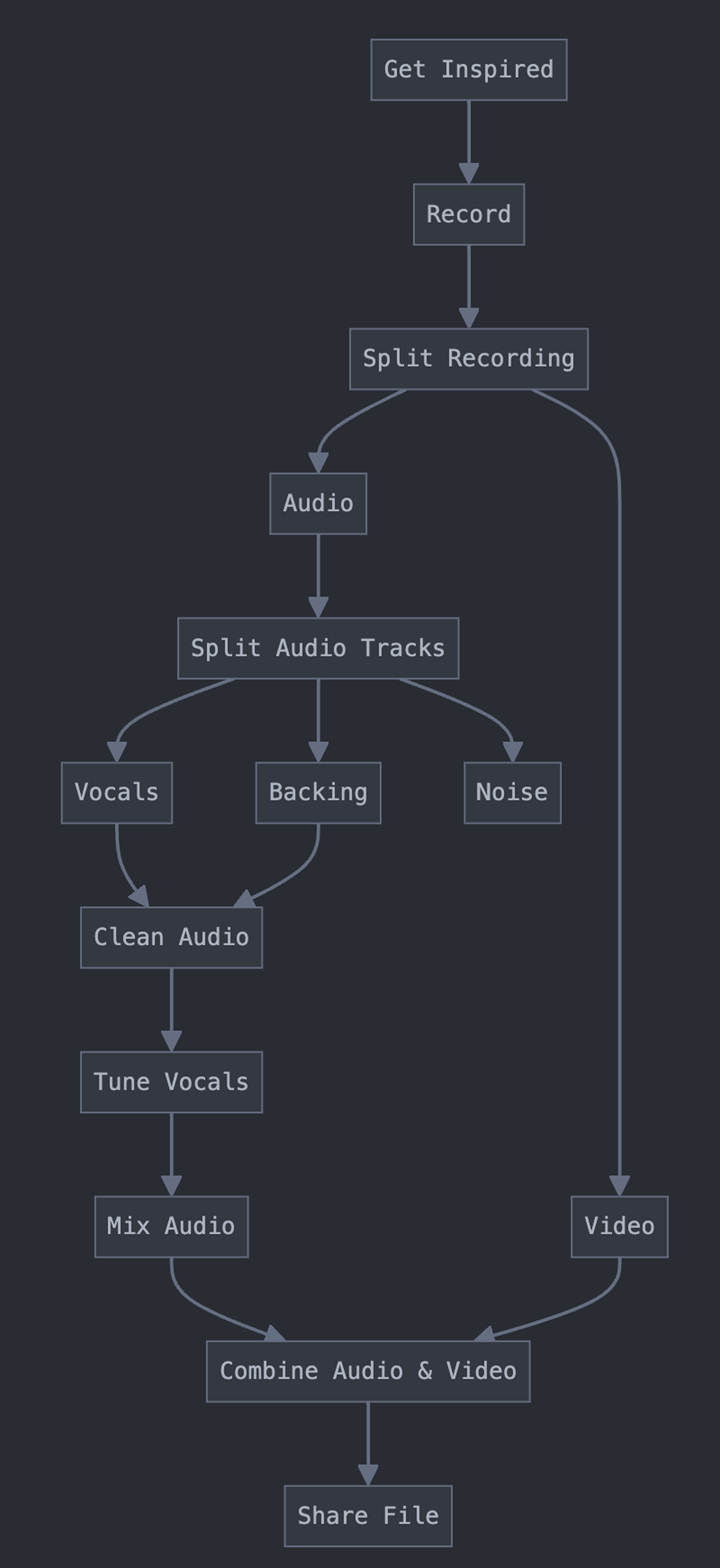
- Stem separation technology for audio processing
- AI-powered noise reduction and audio cleanup
- Recording with backing tracks
- Lyric creation and display while recording
- Cross-platform compatibility and DAW integration
Q: Can I use VoCap to record with backing tracks?
A: Yes, VoCap allows you to record vocals while playing backing tracks, making it easier to create complete musical pieces directly from your mobile device.
Q: Does VoCap have pitch correction like AutoTune?
A: Yes, VoCap includes professional-grade pitch correction technology from Antares, the creators of AutoTune. You can enhance your vocals with various levels of pitch correction based on your preferences.
Q: What audio effects are available in VoCap?
A: VoCap offers a comprehensive suite of audio effects as different presets. They include and blend together reverb, echo, pitch & throat adjustments, breath control, duet effects, compression, tube emulation, chorus, vocoder, EQ, mutation effects, high/low pass filters, motion effects, and AutoTune mix controls.
Q: Can VoCap clean up background noise in my recordings?
A: Yes, VoCap features AI-powered noise reduction and audio cleanup capabilities that help isolate and enhance your vocals by reducing unwanted background noise. Note that currently this works best with removing noise from the vocal track, not the accompaniment.
Q: Does VoCap support lyric display while recording?
A: Yes, you can create and display lyrics directly in the app while recording, making it easier to keep track of your performance.
Technical Questions
Q: How does VoCap's audio processing compare to professional DAWs?
A: While VoCap brings professional-grade audio processing to mobile devices, it's designed to complement rather than replace full DAWs. It offers high-quality results optimized for mobile use and provides seamless export which allows integration with professional DAW workflows when more advanced editing is desired.
Q: Can I export my VoCap recordings to other software?
A: Yes, VoCap is designed with cross-platform compatibility using the iOS Share Sheet, allowing you to export your recordings for further editing in professional audio software.
Q: How does stem separation work in VoCap?
A: Stem separation technology allows VoCap to isolate different components of an audio recording (vocals, instruments, beat) for separate processing. This enables more precise control over each element of your audio.
Q: Will VoCap work well on older mobile devices?
A: VoCap is optimized for mobile performance but professional audio processing can be resource-intensive. For the best experience, newer devices with updated operating systems are recommended. Specific minimum requirements can be found in the app store description.
Q: Does VoCap require an internet connection?
A: You must be connected to the internet when opening the app. While some features may require internet connectivity, most core recording and processing functions can be used offline if you lose connection during your session. Cloud-based features and certain AI-powered processes may require an internet connection.
Getting Started
Q: How do I create my first recording in VoCap?
A: To create your first recording:
- Open the VoCap app
- Toggle to audio only or video
- Tap record
- Use the stop button when finished
- Choose a preset or customize your audio settings
- Save your recording and add any additional effects or processing
Q: What are presets and how do I use them?
A: Presets are pre-configured combinations of audio effects and settings designed for specific vocal styles or genres. To use a preset:
- Open a project
- Slide between different presets or tap Edit FX to see more details
- Select a preset to apply it to your recording
- Adjust individual parameters if desired
Q: Can I customize the audio effects?
A: Yes, VoCap allows you to customize audio effects by using different presets. You can start with a preset and adjust the vocal tuning, key, and some elements of the effect.
Q: How do I improve the sound quality of my recordings?
A: For better sound quality:
- Record in a quiet environment with minimal background noise
- Use a good quality microphone and interface or headset if possible
- Position yourself at an appropriate distance from the microphone
- Experiment with different presets and effects to find what works best for your voice
Troubleshooting
Q: Why am I experiencing latency or delay when recording?
A: Latency can occur for a number of reasons. Some of the most common causes are:
- Device processing limitations
- Complex effect chains requiring more processing power
- Background apps consuming resources
- Low device battery affecting performance
Try closing background apps, reducing effect complexity, updating your device OS, or switching to a lower latency recording mode if available.
Q: Why does my recording have background noise?
A: Background noise can come from:
- Environmental sounds in your recording space
- Electrical interference with your microphone
- Device microphone limitations
- Improper microphone positioning
Use VoCap's AI-powered background remover to get a clean acapella, record in a quieter environment, or use an external microphone for better isolation.
Q: Why doesn't my recording sound like the preset I selected?
A: Presets are designed as starting points that can sound different based on:
- Your individual voice characteristics
- The recording environment
- Your microphone quality
- How you're singing or speaking
Try adjusting preset parameters to better match your voice and recording conditions.
Q: The app is crashing or performing slowly. What should I do?
A: If you experience performance issues, try the following workarounds:
- Close background apps to free up resources
- Restart your device
- Ensure your operating system is up to date
- Check for VoCap app updates
- If problems persist, try reducing effect complexity or recording quality settings
Account and Subscription
Q: Is VoCap free to use?
A: VoCap is currently free to use, but may offer both free and premium functionality in the future.
Q: How do I provide feedback or report issues with VoCap?
A: You can provide feedback or report issues through:
- We recommend using our Discord Server, found in the settings menu
- Alternatively:
- Reach out through AutoTune's social media channels
- The in-app feedback form in the settings menu
- Contact our support team here
Integration and Workflow
Q: Can I collaborate with others using VoCap?
A: VoCap is designed with collaboration in mind. You can export your projects in formats compatible with other software to share your recordings directly to various platforms.
Q: Can I share my VoCap recordings directly to social media?
A: Yes, VoCap includes options to share your finished video recordings directly to various social media platforms and content sharing sites, making it easy to publish your creations.
Q: Can I use VoCap recordings commercially?
A: Yes, audio created with VoCap belongs to you and can be used commercially according to the app's terms of service. However, always ensure you have the appropriate rights to any backing tracks or samples used in your recordings.
Comments
0 comments
Article is closed for comments.