
This article will walk you through the installation and activation process for Duo.
1. Get Your Registration Code
Your registration code for Duo is available in your Avid account. Please follow these steps to find your registration code:
- Log into your Avid account here
- Click "View my Products"
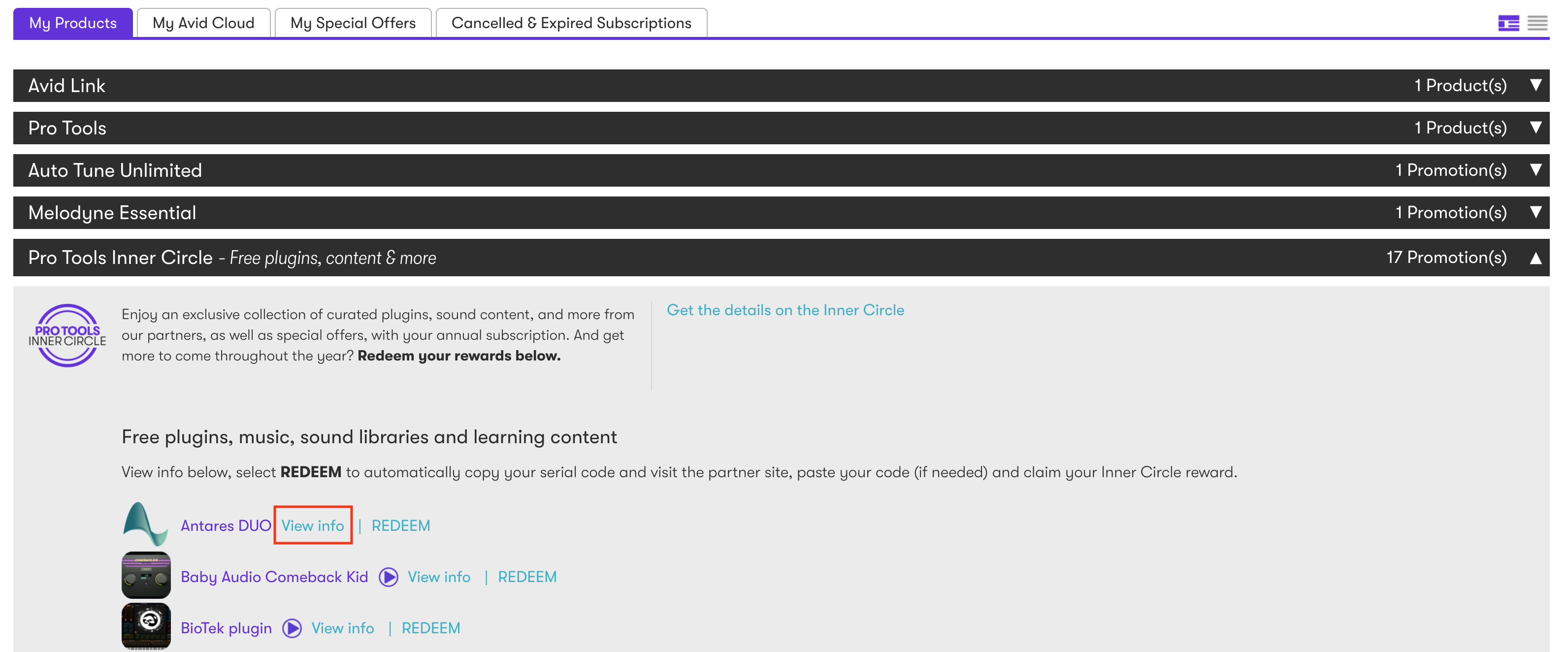
- Scroll down and expand the “Pro Tools Inner Circle - Free plugins, content & more” section
- Click "View Info" to reveal your registration code
Once you have your registration code, you're ready to move onto the next steps. Your license for Duo can be activated on up to two computers at a time. Repeat these steps for each computer:
2. Install Duo
If you do not already have Auto-Tune Central installed, please follow the instructions here.
In the top banner of Auto-Tune Central select "Redeem a License." Enter your 25-digit registration code then select "Redeem and Activate."
Navigate to the "Plug-Ins" tab, find your license, activate and install from there.
Now that your license is activated, you're ready to use Duo!
Duo is a part of our suite of professional Vocal Effects plug-ins. From harmony creation and microphone modeling, to subtle warmth and doubling, to extreme vocal effects, Vocal Effects are an essential toolkit for vocal and audio production. Click here to learn more.
Feel free to reach out to us if you have any questions or need further assistance.
Comments
0 comments
Article is closed for comments.